Turn your local knowledge into a map

Create a collection, add your advice and see it through the eyes of someone opening it.

Start with Share, for free. No card required.

How you do it

  1. 1

    Choose your PinTips address

    You sign up with your email or with Google and pick a username. That name becomes your address, pin.tips/yourname, and every map carries it inside its link.

    No card. On the free plan there is no cap on maps or places.
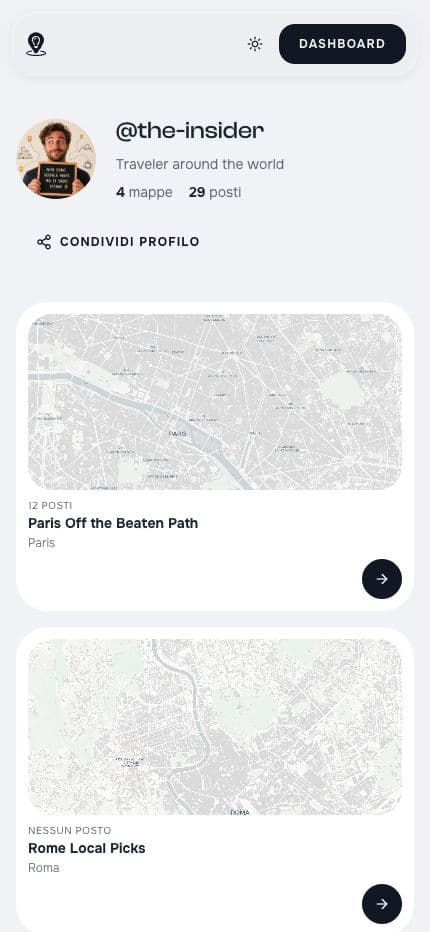
    Public profile of @the-insider with their maps
    pin.tips/the-insider

    Actual public profile of @the-insider, captured 23 September 2026.

  2. 2

    Collect places and add your advice

    You choose the point it opens from, then add places by searching their name or tapping the map where they are. Under each one you add your note you would say out loud, and add a photo and the hours if you want.

    Stops lined up become an itinerary. With Connect+, Suggestions find you places by category around a point.

    Boot Café
    Coffee
    There's barely any seating, so grab your flat white to go and snap the photogenic blue storefront. Come early on a weekday — only a handful of people fit inside.
    Boot Café · Paris. A recommendation from the public map by @the-insider.
  3. 3

    Share the map

    You copy the link or download the QR code. On WhatsApp the link arrives with the map preview; the QR code you print and stick where it is needed.

    Content changes appear when the same map is reopened. Links and QR codes depend on the map, username and continued availability.

    Open the sharing panel used by PinTips, with the public link and QR code for the example map.

    The QR opens the public Paris map on pin.tips.

What happens when someone opens the link

People can open your map in their browser, read the notes and details you added, and open directions to a place. Viewing needs no account; saving a place to their own map requires sign-in.

  • Opens in the phone browser
  • An account is needed to create or save
  • Directions open in an external navigation service
  • The interface is in English and Italian
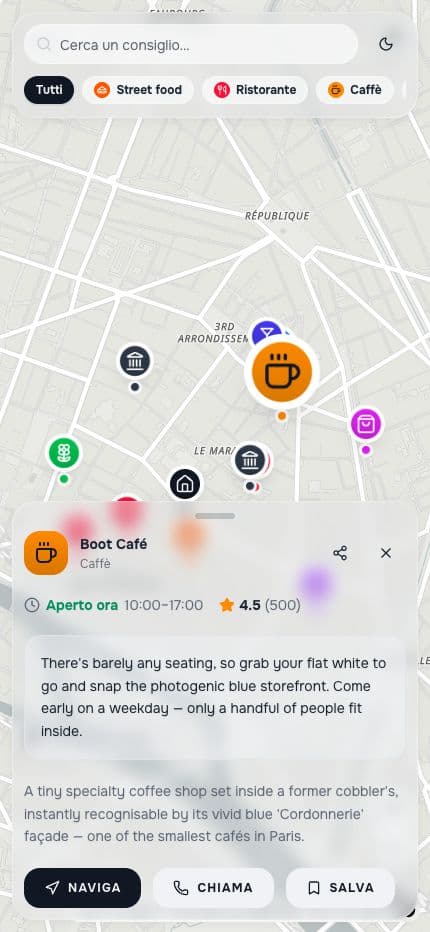
The public Paris map with the recommendation for Boot Café open
Boot Café · Café · Paris

Your map can keep growing

When a recommendation changes, edit the contents of the same map. People reopening its link see the update.

Read recorded views and actions. Basic Insights are included in Share; Connect+ offers more detail. These are not measures of physical visits or sales.

With an account, a reader can copy an individual place into their own map. The copy is independent of later updates to the original.

The questions people ask when starting

All the questions

What's the first place you want to keep?

Create your map

Start with Share, for free. No card required.