A Google Maps list or a PinTips map?

Google Maps already lets you save places, add notes and share lists. PinTips organises recommendations into personal maps, with place cards and a profile that brings your maps together.

Start with Share, for free. No card required.

Choose for the job you need to do

If you want to save places in the Google tools you already use, lists are a natural starting point, including for collaboration. Choose PinTips to curate collections with your photos and notes, bring them together in a profile and share them through built-in QR codes.

Both help you keep and share places. This comparison focuses on how you organise recommendations; personal notes are not exclusive to PinTips.

Differences to consider

Differences to consider
Differences to considerGoogle Maps listsPinTips
Reading a shared mapGoogle Maps lists

Lists can be viewed in Google Maps on the web and in its apps.

PinTips

Public maps open in a browser. A mobile app is part of the future direction.

AccountGoogle Maps lists

Your Google account manages your lists. Sharing options determine who can find them.

PinTips

Not needed to read. Required to create maps or copy places into your own.

Personal contentGoogle Maps lists

Place notes and a list description. Shared lists can also have other editors.

PinTips

Personal notes and photos attached to places; a profile with public maps.

Hours and informationGoogle Maps lists

Place information within Google Maps.

PinTips

Available hours appear in the place card. The map owner should check the information.

SharingGoogle Maps lists

A list link, with sharing and collaboration options.

PinTips

Built-in links and QR codes. Updating the same map’s content does not require a new QR code.

Plans and pricingGoogle Maps lists

Free.

PinTips

Free Share; paid Connect+. See the pricing page for current prices and features.

Sources and comparison criteria

Sources checked on 28 September 2026. Features and terms can change. The digital guidebook comparison describes a category; check the specific product you are considering.

What happens when someone opens the link

People can open your map in their browser, read the notes and details you added, and open directions to a place. Viewing needs no account; saving a place to their own map requires sign-in.

  • Opens in the phone browser
  • An account is needed to create or save
  • Directions open in an external navigation service
  • The interface is in English and Italian

Boot Café

Café · Paris
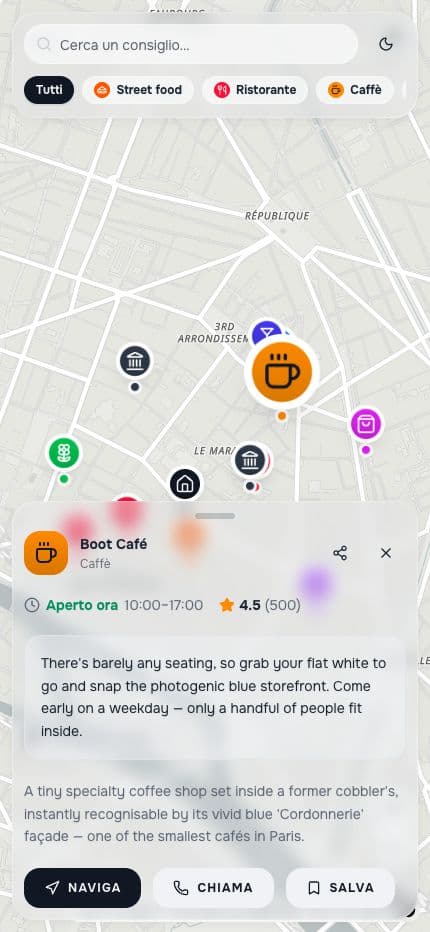
The public Paris map with the recommendation for Boot Café open

Try collecting your recommendations on PinTips

Create your map

Start with Share, for free. No card required.